
X-StudioX-Studio
All case studies
X-StudioX-StudioCase Study

X-Studio × Sora · 2025

A private space for everything you want to remember.

Sora is a personal memory layer. Save anything without deciding where it belongs, then find it the way you actually remember it, which is rarely a folder and usually a phrase like that restaurant in Tokyo.

What we did

  • Product Strategy
  • Product Design
  • Brand Identity
  • AI UX
  • Design System
  • Motion Direction
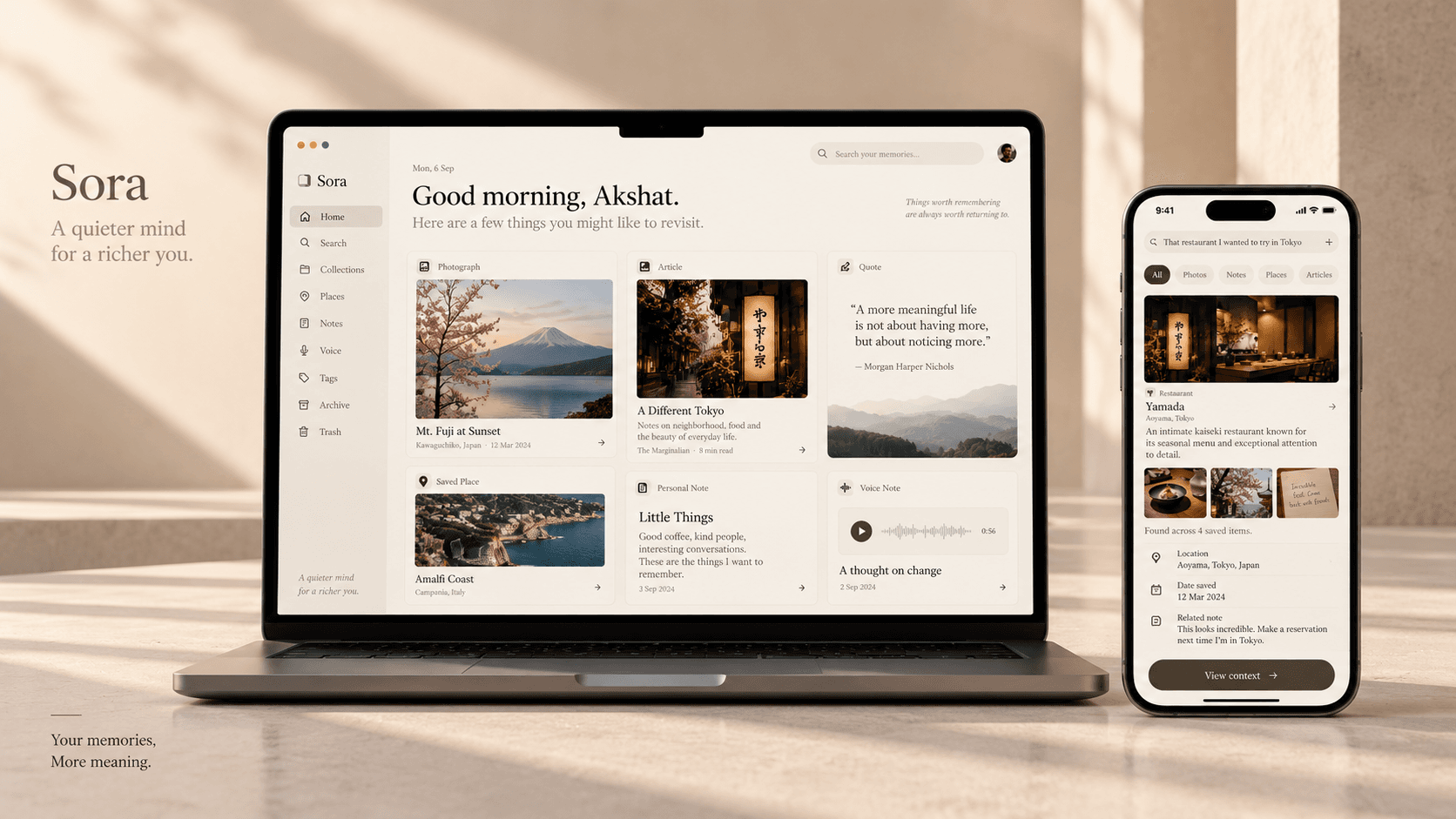
Sora on a laptop and phone, showing a personal archive of photographs, articles, notes and voice memos
Client
Sora (concept)
Year
2025
Platform
Web & mobile
Scope
Product, brand, AI UX

Studio concept. Sora is an X-Studio exploration rather than client work. It is published to show the studio's approach to personal AI products, not to describe a released application.

01 · The project

Saving something is not the same as remembering it.

Every day we save things. Articles, photos, ideas, quotes, places, voice notes, screenshots, conversations. Almost none of it is ever found again, because finding it would require having filed it correctly at the moment we were least interested in filing anything.

Sora is a concept for a private memory layer between the things we collect and the things we remember. Instead of asking people to organise everything into folders, it understands context and surfaces the right thing at the right moment.

This is a studio exploration into a more human approach to personal AI.

02 · The opportunity

Nobody remembers in folders.

Most knowledge tools ask people to organise information. Real memory does not work that way: it works by association, and the association is usually a place, a feeling or a fragment of a sentence.

So Sora is designed around the phrases people actually use when they are trying to find something again.

  • That restaurant in Tokyo.

  • The article about the designer I liked.

  • That quote I saved last year.

  • The idea I had while travelling.

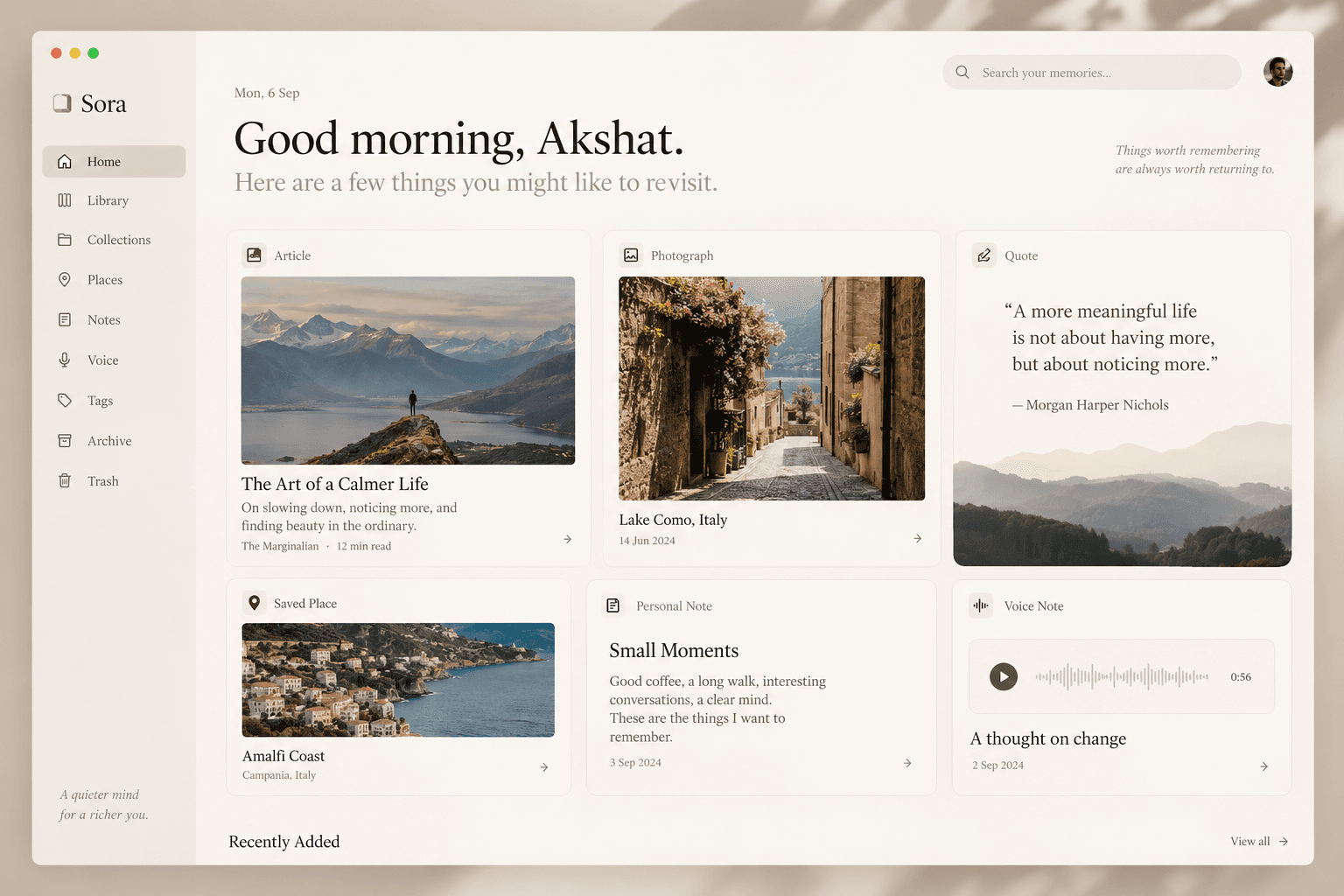
The Sora home screen showing saved articles, photographs, quotes, places, notes and voice memos as an editorial grid
Home is an archive, not a dashboard. The things saved are shown as themselves rather than as rows in a list.

Folder, travel, Japan, Tokyo. Or just: show me the restaurant I saved in Tokyo.

The difference the product is built on

03 · Product principles

Four rules for a product built on memory.

  • Capture without organising

    Saving should be effortless. Nobody should have to decide where something belongs before they are allowed to keep it.

  • Search the way you remember

    People describe things naturally. The product should meet that description rather than demanding a path through a hierarchy.

  • Context over categorisation

    An article relates to a note, a note to a place, a place to a photo. Sora builds those relationships so the person does not have to.

  • Private by design

    Personal memory is deeply contextual. Privacy has to be communicated clearly and control has to be understandable.

04 · The core experience

A personal archive, not a productivity dashboard.

  • Home

    A visual picture of what has been collected: recent saves, places, articles, notes, quotes and suggested connections.

  • Capture

    Links, photos, screenshots, text, voice and notes, saved with almost no friction and no decisions required.

  • Search

    The heart of the product. Questions in natural language, answered by intent rather than keyword matching.

  • Connections

    Relationships between saved items surfaced automatically, so a place can lead to a photo, a note and an article.

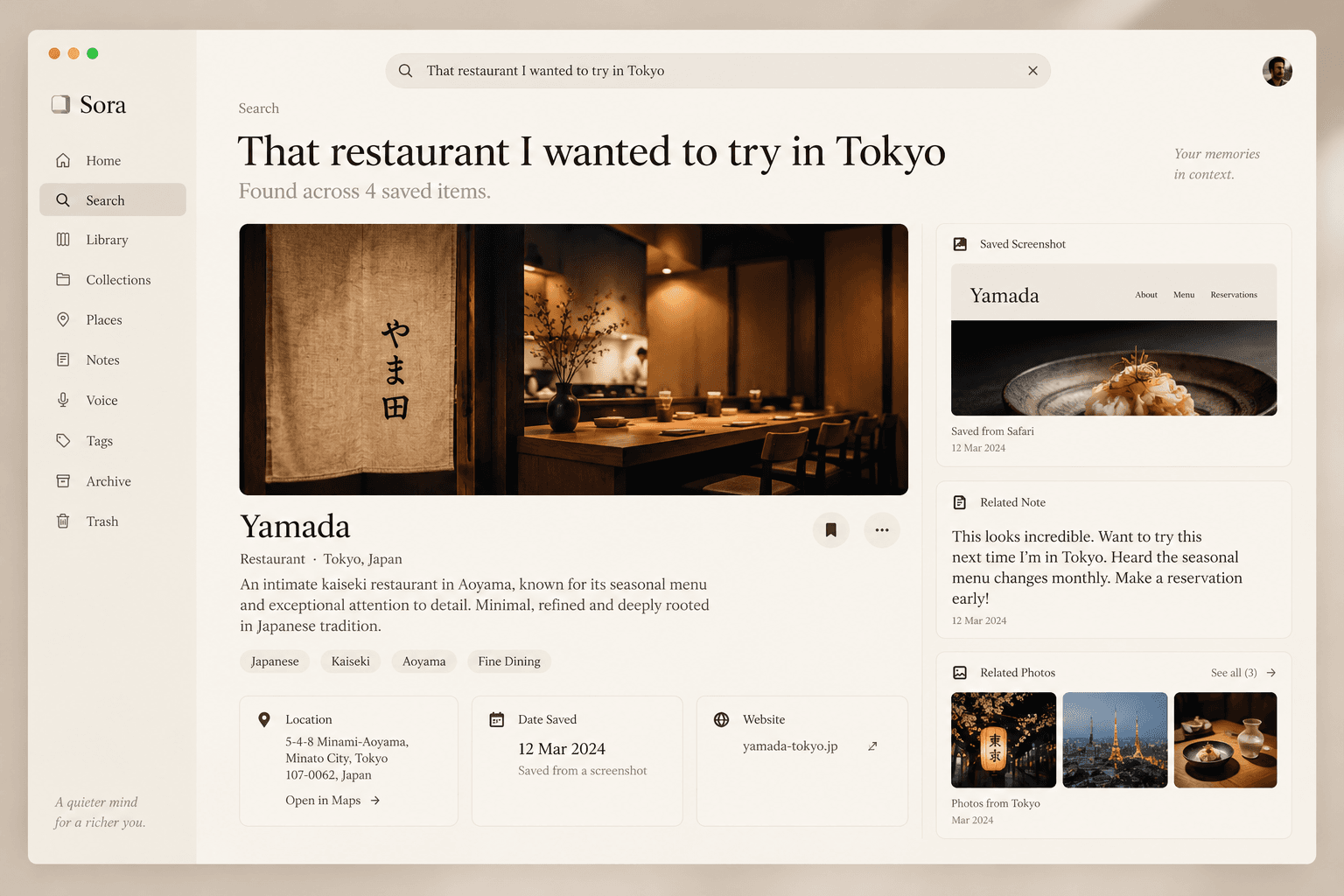
A Sora search for that restaurant I wanted to try in Tokyo, returning the place with its saved screenshot, related note and photographs
The query is the phrase somebody would actually say. What comes back is the place, the screenshot it was saved from, the note written at the time and the photographs around it.

05 · The signature interaction

Remember when I was researching places to work from in Tokyo?

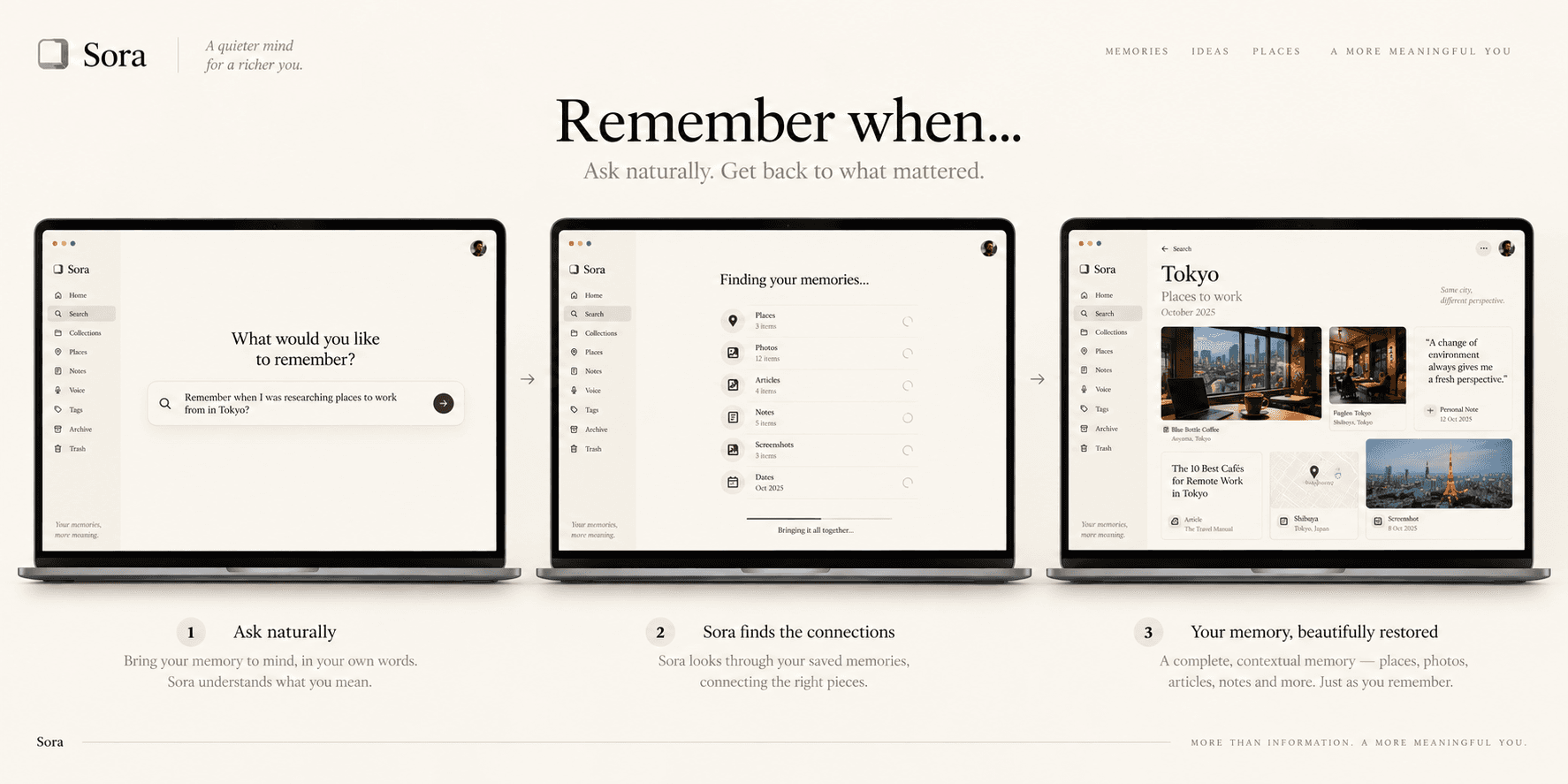
Sora assembles the answer out of everything it holds: places, notes, screenshots, articles, dates and related photos, gathered around the question that was actually asked.

The result is not a list of search hits. It is a reconstructed context, which is much closer to what remembering something actually feels like.

Three steps showing a natural language question, Sora gathering related saved items, and the reconstructed memory
Ask, gather, restore. The middle step is the product: everything saved is searched for relationships rather than matched against keywords.

06 · Collections

Structure that appears on its own.

Sora supports lightweight collections without asking anyone to maintain a folder tree. Tokyo. Design references. Books to read. Ideas. Places. They emerge from activity rather than being declared in advance.

Collections can also be temporary, which matters more than it sounds: most gathering happens around a trip or a project and stops being useful the moment that ends.

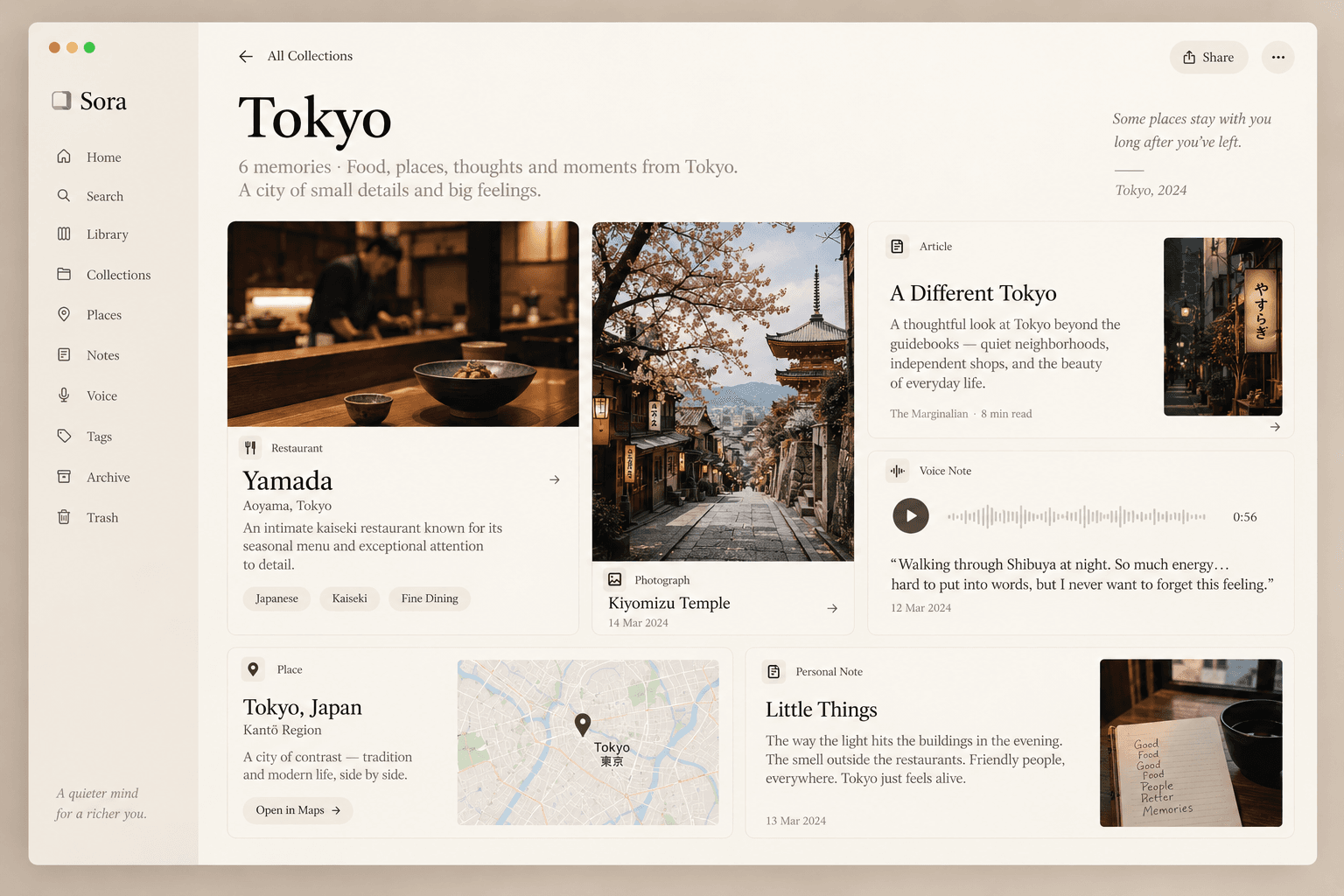
The Tokyo collection in Sora, gathering a restaurant, a photograph, an article, a voice note, a place and a personal note
A collection is whatever was gathered around a trip, held together by the trip rather than by a folder somebody had to name in advance.
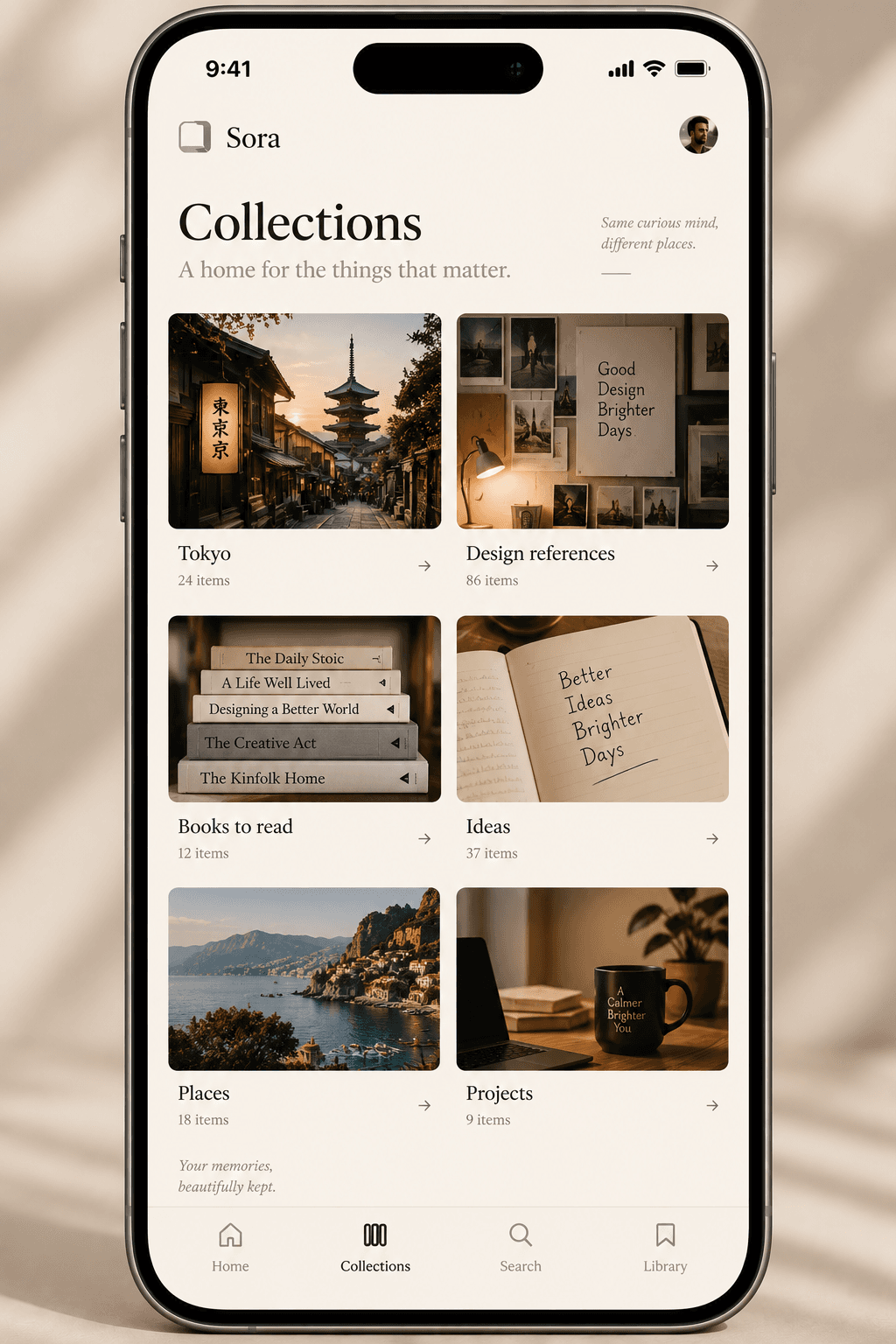
The Sora collections screen on mobile, showing Tokyo, design references, books to read, ideas, places and projects as image-led cards
Collections are image-led because that is how people recognise their own material.

07 · The AI experience

Intelligence should be invisible until it is useful.

There is no AI section in Sora. Adding one would be an admission that the intelligence had not been designed into anything. Instead it shows up inside interactions people already understand.

  • Natural-language search

  • Automatic grouping

  • Suggested connections

  • Contextual summaries

  • Memory resurfacing

  • Emergent collections

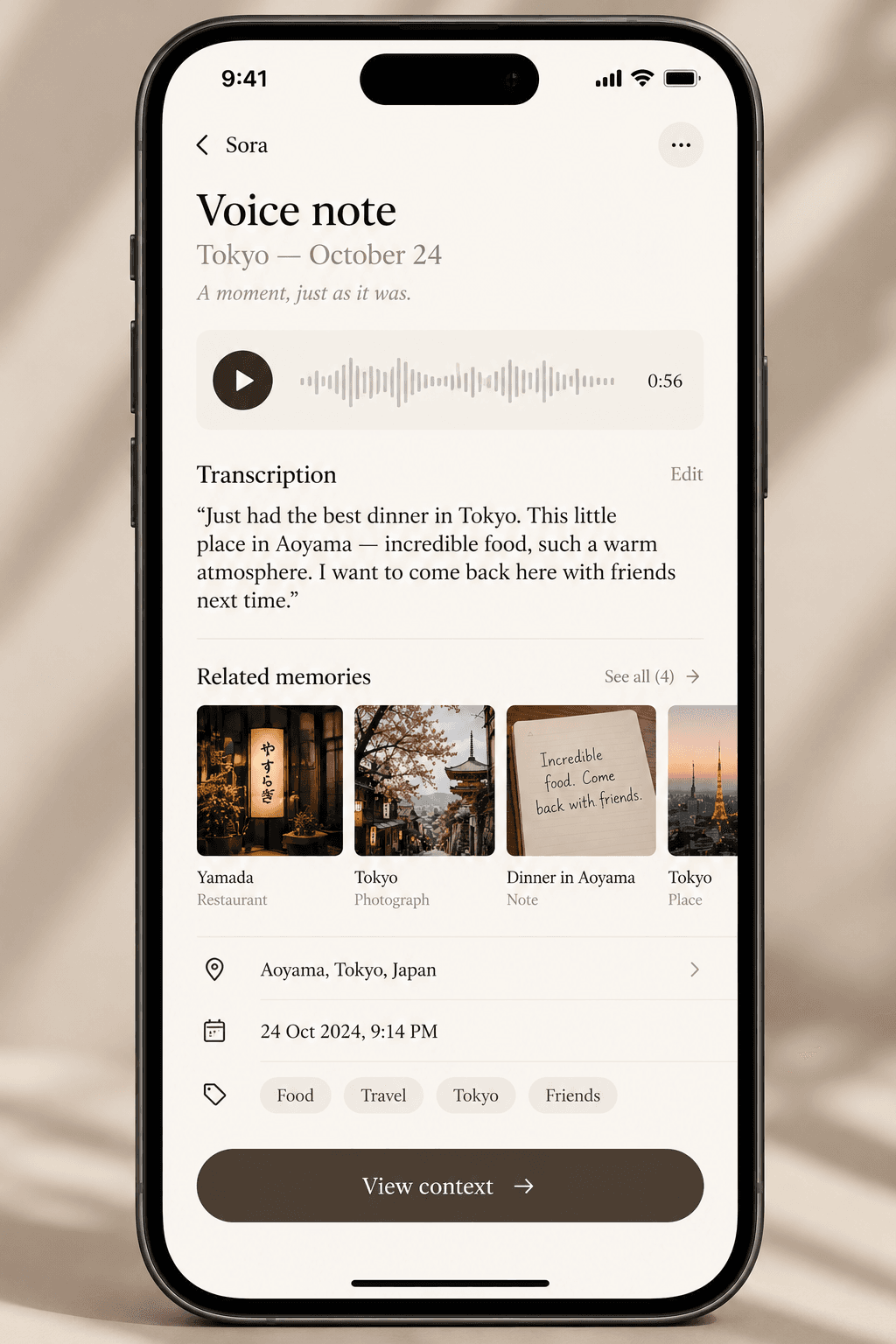
A Sora voice note with its transcription, related memories, location, date and tags
A voice note keeps its transcription, its place, its date and everything Sora connected it to, so a thought recorded walking down a street can be found again from any of those directions.

08 · Responsive design

Two different relationships with the same archive.

Desktop

Asks: what connects to this?

  1. 01Explore relationships
  2. 02Build collections
  3. 03Review a period
  4. 04Read at length

Mobile

Asks: can I save or find it right now?

  1. 01Capture in a second
  2. 02Search by phrase
  3. 03Revisit recent memories

09 · Visual direction

The softest product in the set.

  • Typography

    Large humanist type paired with quiet utility text.

  • Colour

    Warm neutrals, subtle tonal variation and restrained use of imagery.

  • Surfaces

    Large image-led cards, generous spacing and soft transitions.

  • Motion

    Movement should feel like discovering something rather than operating software.

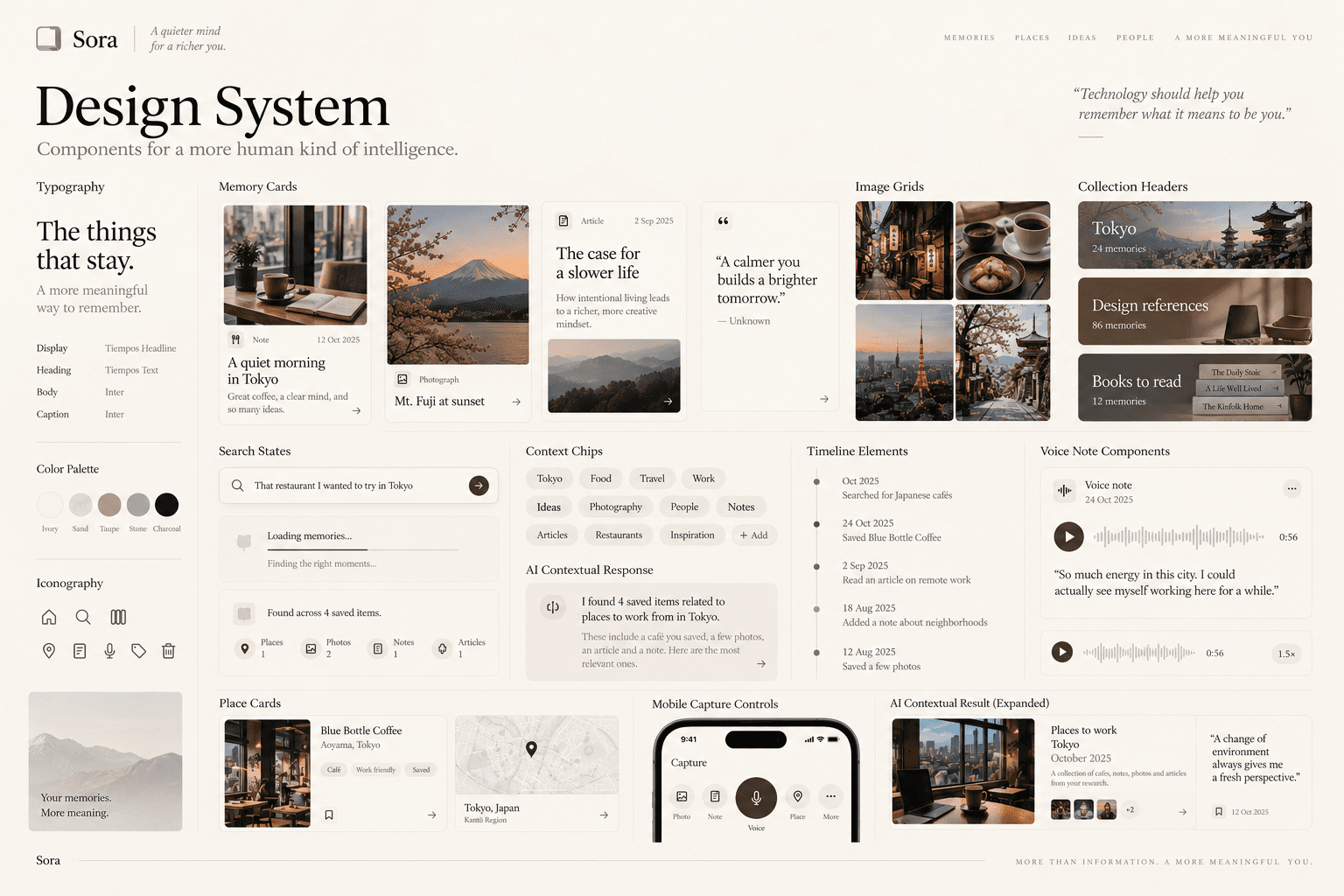
The Sora design system board showing typography, colour, memory cards, image grids, collection headers, search states and AI response components
The system has to hold content it cannot predict: a screenshot, a paragraph, a landscape, a fifty second recording. Everything here is built to survive that.

10 · The takeaway

Not talking to an AI. Just having a better memory.

Sora let us explore AI beyond the assistant interface. Instead of building another chatbot, we looked at what happens when intelligence becomes part of the structure of a personal product rather than a panel bolted onto the side of one.

The system underneath can be sophisticated. The thing the person experiences should simply be that they remember more than they used to.

Got something worth building?

Contact Us